

As of October 26, 2026, Signatoro, the agentic email signature platform, is listed on the Zoho Marketplace as Signatoro signature for Zoho Mail. Make your signature on Signatoro, click "Install into my Zoho Mail" and approve access in Zoho. Signatoro adds the signature to your Zoho Mail settings, sets it for the address you send from, and writes every later change to it, yours or your company's, within seconds. It is free for one person.
What a Zoho Mail signature takes by hand
In Zoho Mail, a signature reaches your emails after four settings:
- Create it under Settings > Signatures and paste it in.
- Link it to your From address under "Associated From address(es) for new emails", or Zoho Mail leaves it out of new emails.
- Turn on "Add signature to all my email replies" for replies.
- Sync the web settings to the Zoho Mail mobile app, which keeps the old signature until you do.
A new title, a new phone number or a new logo means the same four steps again, for every person at the company. The Zoho Mail signature guide has each step and the fixes for a signature missing from replies or the app.
What the install does
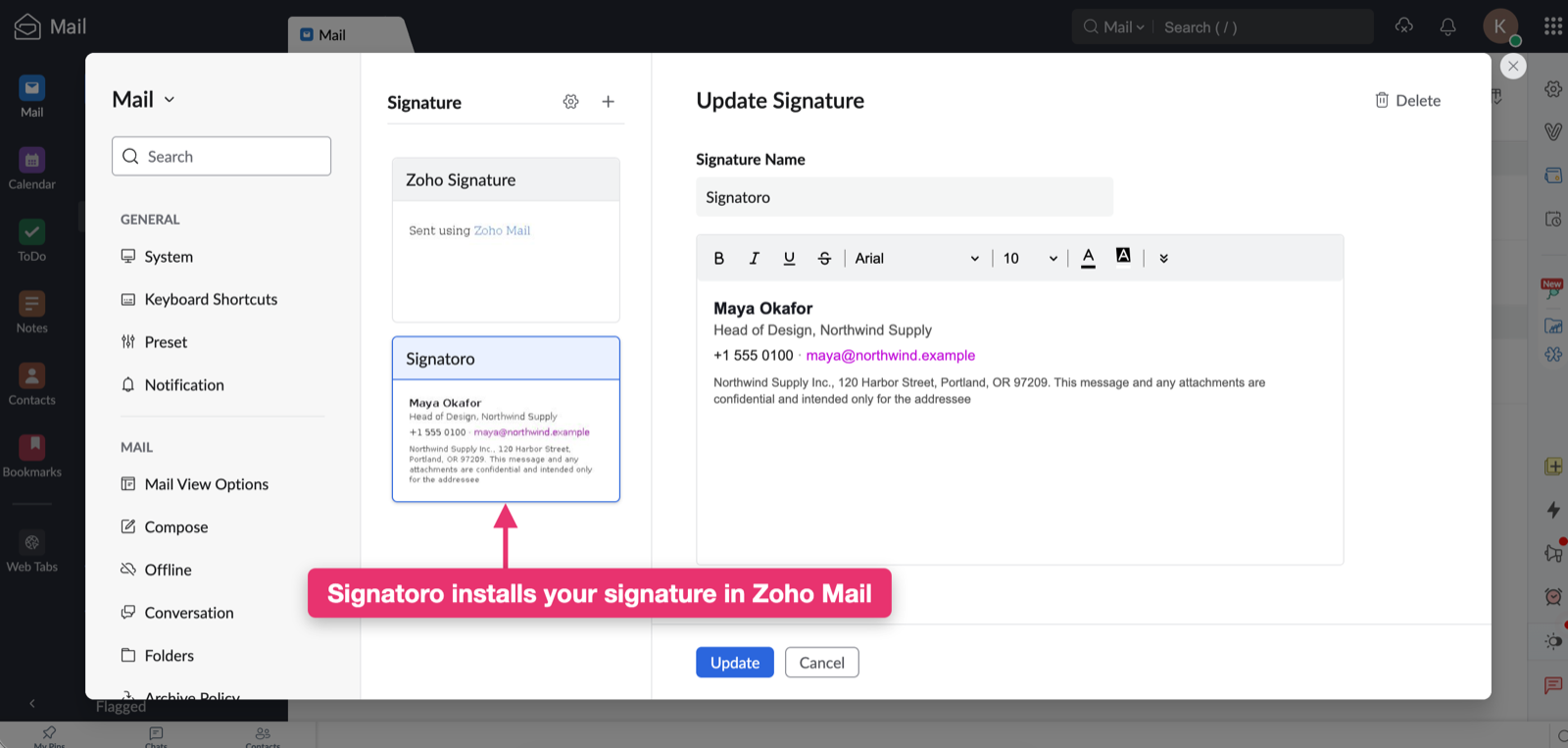
One click on your Signatoro signature page, and an approval on Zoho's consent screen, does the first two steps:
- Signatoro adds a signature named "Signatoro" to your Zoho Mail settings.
- It sets it for new emails from the address you send from, and places it above the quoted text in replies.
For replies, turn on "Add signature to all my email replies" once, under "Signature for replies" in Zoho Mail's settings. It stays on through every later update.
From then on, each signature you save on Signatoro is written to the same signature in Zoho Mail. Your other Zoho Mail signatures stay as they are. An hourly check writes any change that has not arrived yet and retries a write that failed.
To stop the updates, click "Disconnect" on your signature page. Signatoro revokes its access at Zoho and deletes what it stored, and the signature stays in Zoho Mail as it is.
Install your signature from the Zoho Marketplace in three steps
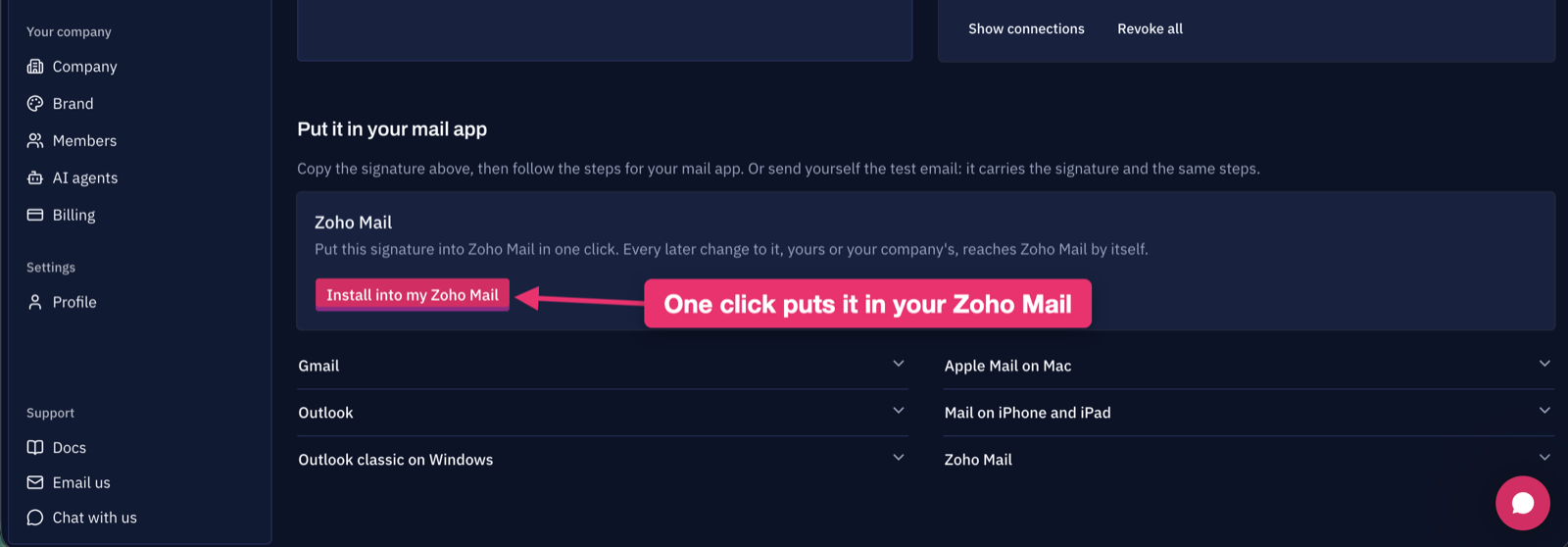
- Open the listing and follow its link to Signatoro, or start on Signatoro. Make your signature and save it to a free account.
- On your signature page, under "Zoho Mail", click "Install into my Zoho Mail".
- Sign in to Zoho if asked, and approve access.
Send yourself a new email from Zoho Mail: it ends with your signature.
For a company on Zoho Mail
On the Company plan, an owner sets the logo, colors, layout and company details once, and invites people by email.
- One click to join and install. An invitation sent to a Zoho Mail address offers "Join and install in Zoho Mail": one click joins the company and puts the signature in that person's Zoho Mail.
- One change, every mailbox. When the owner changes the logo, a color or someone's title, every connected person's Zoho Mail gets the new signature by itself.
- A roster that shows who is up to date. The member list shows "Zoho Mail: updates itself" for each connected person, and "reconnect needed" when someone's access has ended.
Plans and prices are on the pricing page.
The same signature for your AI agents
The signature you install in Zoho Mail is the one your AI assistants fetch when they send email for you. Connect Claude, ChatGPT or another assistant to Signatoro's MCP server or API, and the emails it sends end with the same saved signature, updated with the same change.
Signatoro for Zoho Mail questions
Is Signatoro for Zoho Mail free?
Yes, for one person. A free Signatoro account saves your signature and installs it into your own Zoho Mail. Companies use the Company plan, on the pricing page.
Which Zoho accounts does it work with?
Zoho accounts in every Zoho data center, from zoho.com and zoho.eu to zoho.in, zoho.com.au and the others, except China (zoho.com.cn). On a China account, copy the signature and paste it in, as in the Zoho Mail guide.
What can Signatoro access in my Zoho Mail?
It reads your Zoho Mail account details to find the address you send from, and it writes the signature it created. The access Zoho grants is stored encrypted. The admin guide lists the three Zoho permissions, what Signatoro stores and how an admin revokes access.
Does the signature reach the Zoho Mail mobile app?
The mobile app takes its signature from the Zoho Mail web settings, where Signatoro writes it. Sync the web settings to the app after the install, as Zoho's help describes, and again after a change: the app keeps the signature it had at the last sync.